Skip to content

Instantly share code, notes, and snippets.

Show Gist options
  • Select an option

  • Save HimDek/e09340eae2861e1ad8b7f6bdba5ee9ff to your computer and use it in GitHub Desktop.

Select an option

Save HimDek/e09340eae2861e1ad8b7f6bdba5ee9ff to your computer and use it in GitHub Desktop.
This Guide will show you how to install and run apk files or Android apps in any Edition of Windows 11 using Windows Subsystem for Android. WSA or Windows Subsystem for Android is a Tool that allows Windows to run Android Apps directly without using any emulator.

Install Android apps or apk files in Windows using Windows Subsystem for Android

WSA or Windows Subsystem for Android is a Tool that allows Windows to run Android Apps directly without using any emulator. The problem is Windows Subsystem for Android is currently only available through preview via the Beta Channel of the Windows Insider Program. But if you follow my guide, you don't have to be in Windows Insider Program to try it out. The only thing you need is Windows 11 installed and some patience.

Prerequisites:

  • Windows Subsystem for Android or WSA must be Installed.

Click here to view the guide that shows how to install Windows Subsystem for Android in any Edition of Windows 11 (including Windows 11 Home) non Inider or stable release.

How to Install Android Apps or apk files in Windows Subsystem for Android:

  • First install Windows Subsystem for Android. Click here to know how to do that.
  • Search and run Windows Subsystem for Android Setting from Windows start menu.
  • The window shown in the screenshot below will appear. There, click on the icon in the extreme left side of the Files box. This will start Windows Subsystem for Android and open the File Manager App in Android. This can take some time so be patient.
  • Keep File Manager running otherwise Windows Subsystem for Android will terminate itself.
  • Enable Optional Diagnostic Data and Developer mode in Windows Subsystem for Android Setting Window and click the Refresh button in the IP address Section.
  • Click here to download the latest version of adb and extract the downloaded zip file.
  • Inside the extracted folder, there should be a file named adb.exe along with a plenty of other files.
  • Put the apk files of the Android apps that you want to install in this folder, and rename them to names that are easier to remember.

    Note: You can download apk files of Android apps from websites like APKPure, APKMirror or F-Droid. These are trusted websites.

  • Copy the path of this folder from the pathbox in Windows File Explorer as shown in the screenshot below: 11
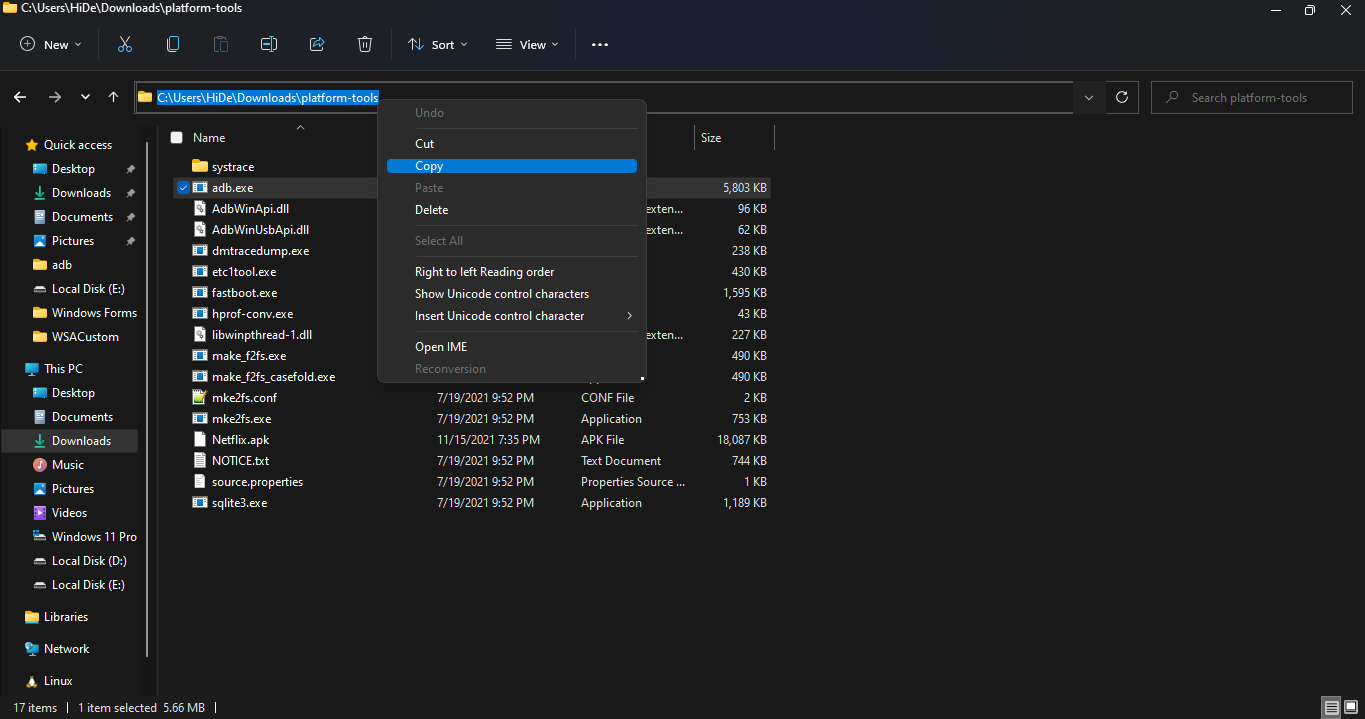
  • Search for Command Prompt in Windows Start Menu and Open it.
  • Type cd "" in the command prompt. Inside those "", paste the copied path by pressing Ctrl + V. The windows should look something like the below screenshot. Then press Enter. 12
  • Now, type adb connect 127.0.0.1:58526 in the Command Prompt Window. Press Enter and wait for the connection.
  • Once connected, type adb install "name.apk" in the Command Prompt. Replace name with the name of the apk file that you want to install and press Enter. After successful install, the installed App will appear in Windows Start Menu. Repeat this step for all the apk files that you want to install and they will appear in Windows Start Menu as well.

Thats it! Thanks for using this Guide. I hope it helped.

@saima32
Copy link

saima32 commented Feb 14, 2026

Great explanation of the setup process. Many users forget to install apps only from trusted sources like the official app stores, which often leads to installation errors or security risks. It’s also important to keep your device updated and allow necessary permissions for the app to function properly. For beginners, following a clear step-by-step guide from reliable sources can help avoid common installation mistakes and ensure a smooth experience with Adobe Lightroom.

@saima32
Copy link

saima32 commented Feb 14, 2026

Great explanation of the registration and login process. Many users forget to enter correct district and plot details, which often causes search errors on the Banglarbhumi portal. It’s also important to double-check the application number and keep your registered mobile number active for OTP verification. Beginners should carefully follow each step while checking land records online to avoid common mistakes and delays. Using clear step-by-step guidance makes the entire process much easier and hassle-free.

@marigoldtheo04-dotcom
Copy link

DK11 Game can be enjoyable for those who like strategic mobile games. The key is discipline. It is not about luck alone; smart moves and timing matter. Users who expect guaranteed income may feel disappointed, but those who play for entertainment and manage their spending wisely will likely find it a fun experience. click here to download.

@marigoldtheo
Copy link

In today’s inflation, the Ehsaas Rashan Program has become a lifeline for many struggling households. The monthly subsidy on basic food items helps families maintain their kitchen without taking loans. What stands out is the data-based eligibility system, which improves fairness in distribution. Some applicants still face verification delays, but the program’s overall direction is very positive. With stronger field support and quicker updates, its reach can become even more effective.

@arslapashatet2-dotcom
Copy link

Thank you for your attention to this exciting tool! A cursed text generator allows users to create unique, glitched, or spooky text styles that stand out on social media, messages, or creative projects. With a cursed text generator, you can easily add a mysterious or edgy vibe to your content, making it more eye-catching and entertaining.

@hianime6607
Copy link

HiAnime is a Free anime streaming website which you can watch English Subbed and Dubbed Anime online with No Account and Daily update. WATCH NOW!

@m65015482-coder
Copy link

m65015482-coder commented Feb 22, 2026

This is a really clear walkthrough, especially for users who don’t want to join the Insider Program just to test WSA. One common issue people face is connection errors with adb, which can usually be fixed by refreshing Developer Mode or making sure the correct APK architecture is used. Also, always download APKs from trusted sources to avoid compatibility or security problems. I’ve tested a few productivity and finance apps this way and even compared them with web tools like whatisthesalary.com, and the performance on Windows 11 through WSA has been surprisingly smooth once everything is configured properly.

Sign up for free to join this conversation on GitHub. Already have an account? Sign in to comment